Configure Your AI Agent
Configure an Agent Capsule in the Config tab.
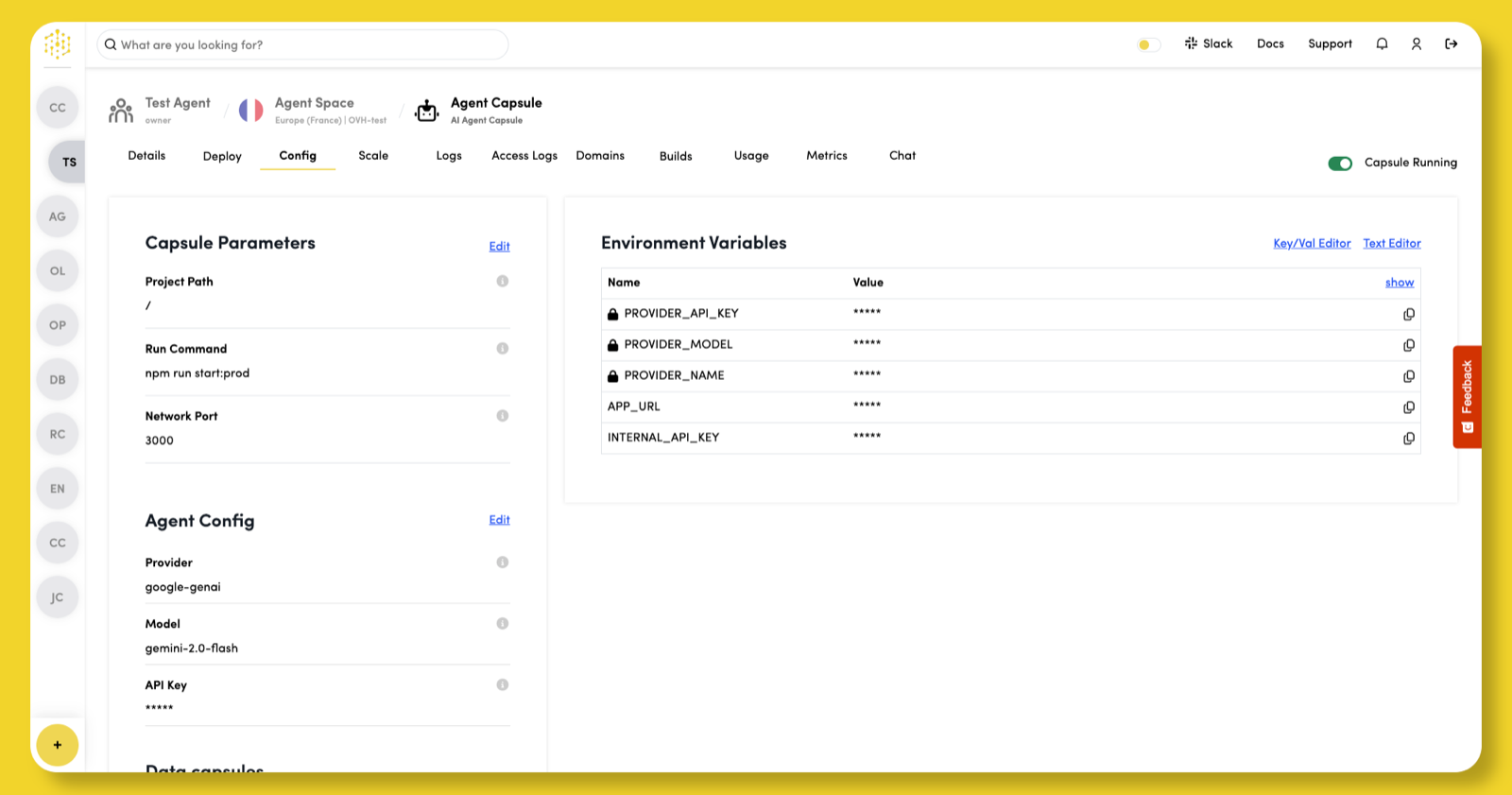
Set Capsule Parameters
The Capsule Parameters section is split into Build and Runtime, each with its own Edit link:
| Section | Settings | When you save |
|---|---|---|
| Build | Project Path, Run Command | Rebuilds and deploys the capsule |
| Runtime | Network Port, Health Check | Redeploys the capsule, without a new build |
To change a setting:
- Click Edit next to Build or Runtime.
- Update the settings.
- Click Save, then confirm.
You can edit one section at a time.
Build settings
When you save a change in Build, Code Capsules rebuilds your code with the new settings and deploys the result. A build can take a few minutes.
Project Path
The Project Path specifies the path to your code. The default is /, which works for most projects.
Run Command
Use the Run Command field to specify how to start your app. Leave this field empty to use the default command for the Capsule type, or enter a custom command:
- Python:
python app.py - Node.js:
npm start
If using a Code Capsules Agent Template, the production ready command is npm run start:prod by default.
Runtime settings
When you save a change in Runtime, Code Capsules redeploys the capsule with the new settings, replacing its running replicas. It does not start a new build.
Network Port
The Network Port is the port your app runs on. Your app must be configured to listen on this port. The default is 3000.
Health Check
A health check tells Code Capsules when your agent is ready for traffic, and restarts replicas that stop responding. To set one:
- In the Capsule Parameters section, click Edit next to Runtime.
- Set Health Check to Automatic or Manual.
- Enter the Endpoint your agent responds to, for example
/health. With Manual, also set Timeout (seconds) and Time to First Check (seconds). - Click Save, then confirm.
See Health checks for each setting, how failing replicas are handled, and how to write a good endpoint.
Set Agent Config
Click Edit in the Agent Config section to set the Capsule's provider, model, and API key.
Provider
The Provider specifies the public AI provider to use for the capsule. This will expose a PROVIDER_NAME environment variable in the runtime of the capsule. Among a few pre-defined options, there is also the ability to set a Custom provider name, which your altered codebase will need to cater for.
Model
The Model specifies the AI model to be used during the agent runtime. This will expose a PROVIDER_MODEL environment variable in the runtime of the capsule. Among a few pre-defined options per provider, there is also the ability to set a Custom model name, which your altered codebase will need to cater for.
API Key
The API Key specified the key as provided by the AI Provider. This is issued outside of Code Capsules but are necessary for the agent to work, and will expose a PROVIDER_API_KEY environment variable in the runtime of the capsule.
Set Environment Variables
Each Agent Capsule is automatically assigned an APP_URL environment variable that stores its public URL.
To view environment variable values, click show in the top-right corner of the table.
To add or edit custom variables:
- Click Key/Val Editor or Text Editor in the top-right corner.
- Enter or update the variable’s Name and Value.
- Click Save to apply your changes.
Connect Data Capsules
Connect a Database Capsule
In the Data capsules section, click the View button next to a Database Capsule to see its connection details.
Click + next to the Connection string variable to create a DATABASE_URL environment variable in your Agent Capsule. Your application will use this variable to connect to and use the services provided by the Database Capsule.
Connect a Persistent Storage Capsule
Click Bind next to the Persistent Storage Capsule to attach it to your Agent Capsule.
During the bind process, Code Capsules creates a PERSISTENT_STORAGE_DIR environment variable that tells your Agent Capsule where to access the Persistent Storage Capsule.