Keep Your Container Image Up to Date
When your Docker Capsule is deployed from an existing image, Code Capsules pulls your image and runs it. There is no Dockerfile build on Code Capsules. This page covers how image deploys work and how to deploy a new version.
For deploy history, logs, and rollback, see Deployments.
How image deploys work
Each time you deploy, Code Capsules:
- Pulls the image from its registry
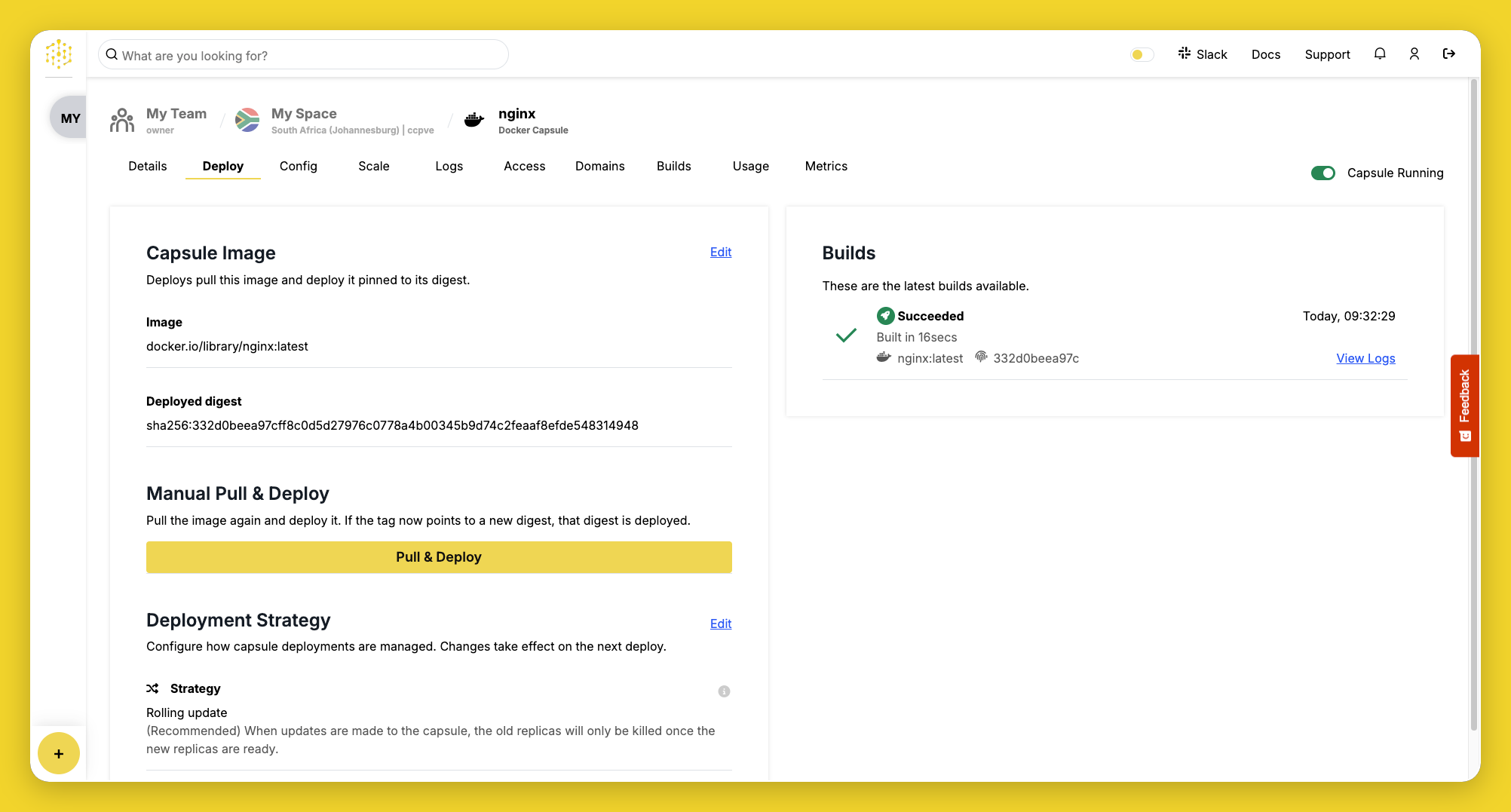
- Records the exact version of the image that was pulled, shown as the Deployed digest on the Deploy tab
- Automatically runs your capsule on success
Each pull appears in the Builds tab as an Image import, with its own log.
Image source
The Capsule Source section on the Deploy tab shows the Image and the Deployed digest, which identifies the exact version of the image that is running. Before the first deploy, it shows Not deployed yet.
Deploy a newer version
Each deploy runs the exact version of the image that was pulled. Publishing a new image to the same tag does not update your capsule automatically, and auto-deploy is not available for image deploys.
To deploy the latest version of your tag:
- Open the Deploy tab.
- Click Pull & Deploy, then confirm.
If the tag now points to a newer version of the image, that version is deployed.
To control exactly which version runs, use a specific tag such as nginx:1.27 rather than latest. You can also reference an image by digest, for example nginx@sha256:<digest>.
Change the image
- Click Edit in the Capsule Source section of the Deploy tab.
- Enter a new Image reference.
- Click Save, then confirm.
Saving a different image starts a new deploy. To build from a Git repository instead, create a new Docker Capsule with Git repository as the source. You can't change the source of an existing capsule.
Troubleshooting
Image deploy fails
- Check that the Image reference is spelled correctly and that the tag exists.
- Confirm the image is public. Private images are not supported.
- Confirm the image is hosted on a supported public registry, such as Docker Hub or GitHub Container Registry. If the registry is not supported, Code Capsules shows an error when you create the capsule or save a new image reference.
Newer image not deployed
- Publishing a new image does not update your capsule. Click Pull & Deploy to pull the tag again.
- If you reference an image by digest, the same version is deployed each time. Change the image reference to deploy a different version.
- Check that your new image was pushed to the same tag your capsule references.
If the image deploys but your application does not respond, see Logs and Container requirements.